The email looked legit. It came from your cable company – or perhaps even your bank – and it included the same logo and formatting you’ve seen on other emails. And the problem it addressed was pressing.
Dear customer, it began, we need you to update your bank account information to fix a billing issue.
Unfortunately, there were red flags along the way, even as the customer provided the requested online account credential for “verification.” The next day the customer noticed multiple transactions she did not initiate, emptying her account.
This isn’t a rare example. Online payment fraud, including trustworthy cash apps, are on the rise because fraudsters are finding ways to access your money.
How do you protect yourself? By learning to recognize some of the common tricks scammers are using.
“Fraudsters have become increasingly bold in their attempts to gain control of customers’ accounts,” said Jon Kucharski, fraud strategy manager at Regions. “Fraudsters are increasingly sending text messages or emails, setting up fake websites and even calling customers to attempt to steal customers online banking information. Don’t be tricked into opening the door to your financials.”
Keep in mind that fraudsters have two primary strategies to separate you from your money:
- Trick you into providing your online banking credentials to them, which they can use to access your accounts and pay themselves
- Trick you into sending them money
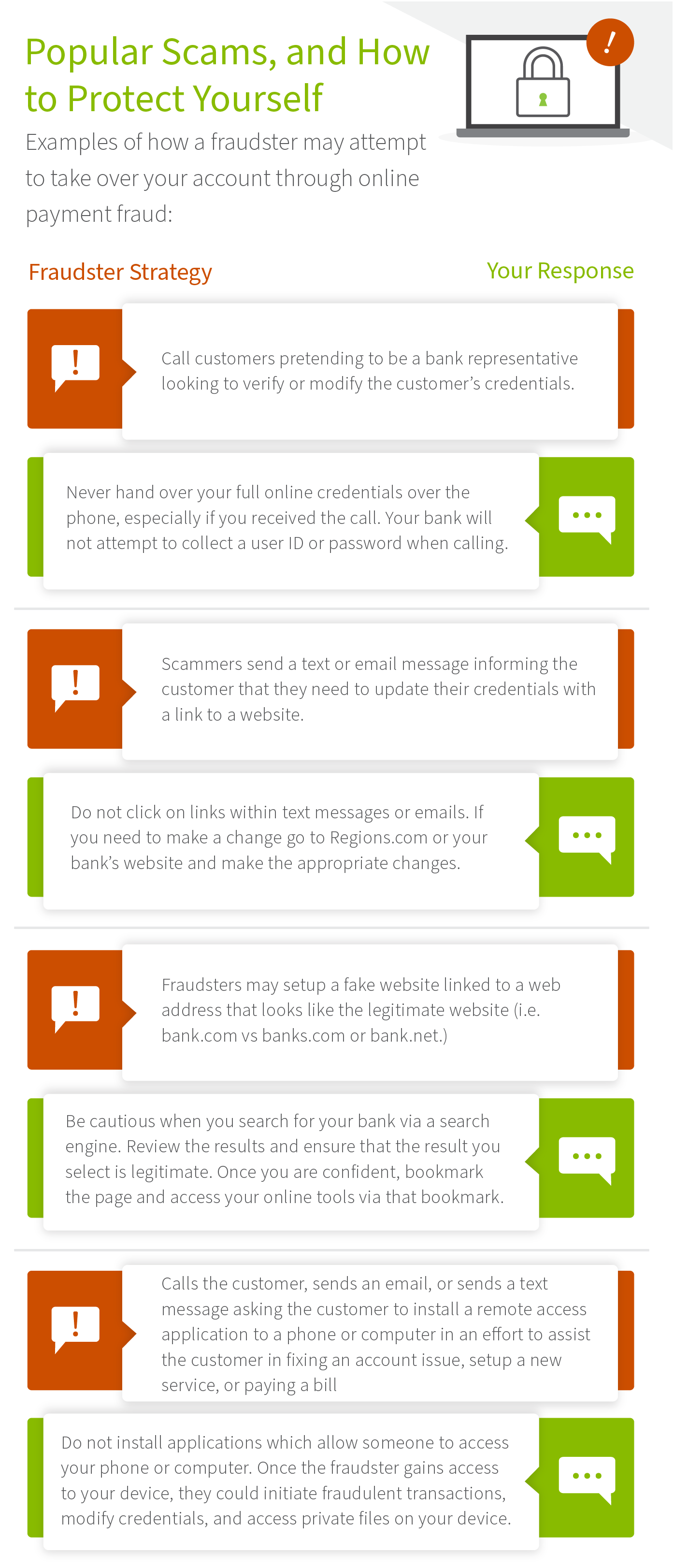
These online payment frauds come in different forms.
In another case, a bank customer received a text message informing him there was a problem with his online retail account. The solution? Install an application on their computer or phone to allow the retailer to fix the problem remotely. Once installed, the customer was asked to call a phone number to complete the maintenance. By now, you’ve probably figured out what the real intent was: the fraudster wanted access not only to the customer’s bank account, but other sensitive files on his device.
Don’t let this happen to you.
“Fraudsters continue to adapt their attacks, so customers need to remain vigilant to protect themselves from being victimized,” Kucharski added. “A healthy level of skepticism should be applied anytime someone asks you for credentials to make a transaction, or to install an app or piece of software on your device. Best thing to do is slow down and think.”

For more information on protecting yourself, your money and your private information:
Preventing Ransomware Attacks Just Got Easier
3 Steps to Better Cyber Hygiene
Fight Financial Fraud in Five Steps
Tax Fraud: Don’t Fall Victim to Imposters
5 Ways to Avoid Card Fraud
The information presented is general in nature and should not be considered, legal, accounting or tax advice. Regions reminds its customers that they should be vigilant about fraud and security and that they are responsible for taking action to protect their computer systems. Fraud prevention requires a continuous review of your policies and practices, as the threat evolves daily. There is no guarantee that all fraudulent transactions will be prevented or that related financial losses will not occur. Visit regions.com/STOPFRAUD or speak with your Banker for further information on how you can help prevent fraud.
Trademarks, and company or application names are the property of their respective owners and used for identification only.